


SparkReceipt: Expense Scanner
4.780.00 Reviews
App Specs
- Version
- 2.2.2
- Updated On
- License
- Free
- Downloads
- 10,000+
- Developer
- SparkReceipt Oy
- Categories
- Business
- Platform
- Android
Screenshots

 Analysis by AppCompare
Before I started using SparkReceipt: Expense Scanner, receipts tended to end up in coat pockets, email threads, or a folder I meant to sort later. That scattered approach made it harder to remember what a purchase was for when I finally needed to review it. SparkReceipt is a business expense app from SparkReceipt Oy that gives those small bits of paperwork a more consistent home. I see its value less as a substitute for good bookkeeping and more as a practical way to keep the records I need from slipping through the cracks.
Fix the receipt habit, not just the backlog
The useful question is not only whether a scanner can read a receipt. It is whether I will actually use it before the receipt gets lost. For me, the strongest case for this kind of tool is a simple rule: capture a purchase soon after making it, then add enough context to recognize it later. That small habit is more sustainable than trying to reconstruct a month of spending from a wallet full of faded slips.
This is especially relevant for freelancers, consultants, and small-business owners who pay for work-related items while moving between jobs or meetings. A taxi receipt, a supply purchase, or lunch during a client day can be easy to forget once the next task takes over. Putting the record in one place soon after paying makes a later review less dependent on memory. I would still follow the record-keeping process required by my accountant or business, but a reliable capture routine can make that process easier to maintain.
Getting Started with SparkReceipt
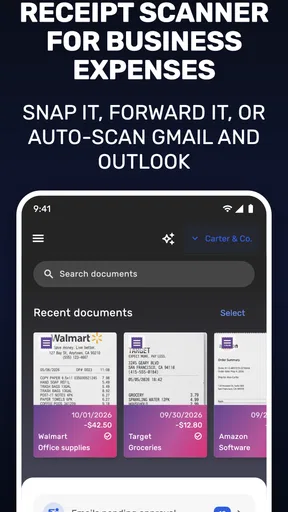
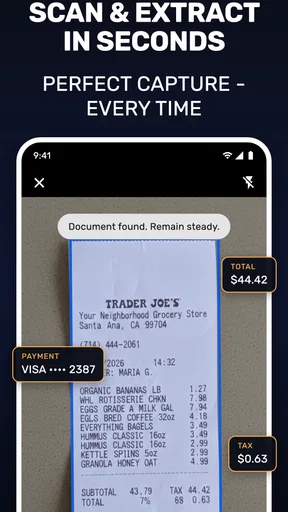
The first thing you'll notice when you fire up SparkReceipt is its clean and intuitive interface. It’s straightforward enough that you don’t need to be a tech wizard to get started. Just snap a photo of your receipt, and the app does the rest. It’s kind of like magic, really.
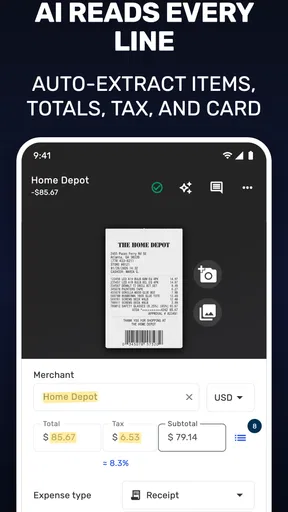
Once you capture a receipt, the app automatically scans and extracts all the important details: merchant name, date, total amount, and more. This means no more manual entry, which is a huge time-saver. Plus, you can categorize your expenses on the spot, making it super easy to track where your money’s going.
Capture while the details are fresh
Automatic extraction is a helpful first pass, not a reason to stop checking the record. I would make a quick habit of confirming the merchant, date, and total after scanning, particularly when a receipt is crumpled, printed faintly, or crowded with several amounts. Correcting a mistake while the purchase is still familiar is usually easier than investigating an unfamiliar number weeks later. For a useful archive, the category matters too: choose labels consistently so that similar purchases remain easy to compare.
A realistic routine might look like this: after buying materials for a job, take a clear photo before leaving the shop, check the total, and assign the expense to the right category. If the purchase needs an explanation, add that context wherever the app’s workflow allows rather than expecting the merchant name to jog your memory later. The practical insight is to treat capture and review as two separate steps. Scanning saves typing, but a brief human check is what makes the resulting record dependable.
Worth Reading Before You Choose

Flipboard Shows What News Apps Must Do Beyond the Feed

Switching to Android Auto Means Rethinking Your Driving Routine

Google Calendar Makes a Crowded Week Easier to Manage

Ludo King Makes the Most of the Minutes Between Plans

Baby Panda World Brings Quick Play to Modern Phones, but Its Game Library Feels Busy

ESPN’s Live Game View Makes Following Close Games Easier
For a long or itemized receipt, I would pay particular attention to whether the extracted total matches the amount charged. A receipt may show tax, discounts, tips, or several subtotals, so the largest visible figure is not always the one that matters for an expense record. Keeping the paper copy until I have checked the scan is a sensible precaution for an important purchase; once I am satisfied, I can follow my own retention requirements rather than assuming a phone image automatically replaces every original.
A Closer Look at the Features
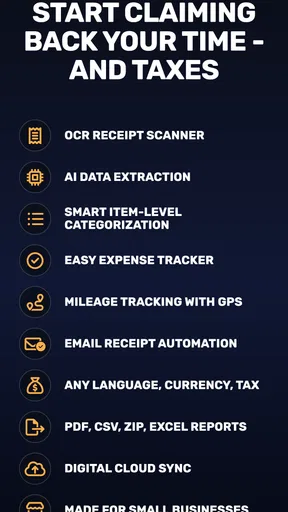
One of the standout features of SparkReceipt is its cloud synchronization. All your data is stored safely in the cloud, so you can access it from any device. This is perfect for those of us who switch between our phones and computers all the time. Plus, your data is always backed up, giving you peace of mind.
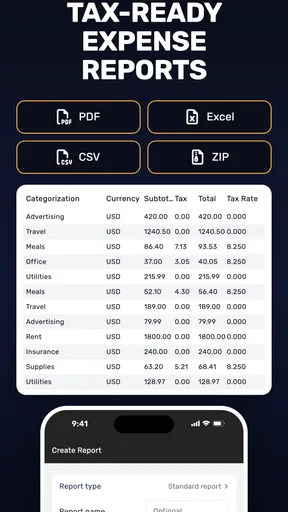
The app also offers detailed reporting features. You can generate comprehensive expense reports with just a few taps. Whether you need a report for work or just want to keep tabs on your spending habits, this feature has got you covered.
Another cool feature is the ability to export your data. You can export your expenses in various formats such as PDF or Excel, making it a breeze to share with your accountant or anyone else who might need it.
Make reports useful beyond tax time
Reports and exports are most helpful when the records going into them are tidy. I would use a consistent category scheme from the start, then review unusual or unclear entries before creating a report. That makes an exported file easier for an accountant to interpret and reduces the chance that I will have to explain a cluster of vague purchases later. Exporting is a handoff, not a guarantee that every entry is complete or suitable for a particular accounting workflow.
Compared with taking receipt photos in a general camera roll, a dedicated expense app has a clearer purpose: receipts sit alongside the information used to organize and report spending instead of disappearing among personal pictures. Compared with a spreadsheet, scanning can reduce the amount of typing, while a spreadsheet may suit someone who wants complete control over columns, formulas, and custom analysis. I would choose based on the work I actually need to do. If a bookkeeper requires a particular format or accounting system, I would check that the exported records fit before relying on them as the only handoff.
Cloud access is convenient when I change devices, but it also makes sensible account and device care important. Receipts can reveal business spending and purchase details, so I would use a secure device and avoid treating a synced archive as public or disposable. The app’s cloud convenience does not remove the need to think about who should see a report before sharing it.
The User Experience
What I love about SparkReceipt is how user-friendly it is. The app guides you through each step, so you’re never left guessing what to do next. The design is sleek and modern, which makes using it a pleasant experience.
Additionally, the app supports multiple currencies, which is fantastic if you’re a frequent traveler. It automatically converts your expenses into your home currency, saving you the hassle of doing conversions yourself. Trust me, this little detail can save you loads of time on the road.
That can make a trip easier to review, but I would still keep the original currency and receipt in mind when checking a converted amount. A converted figure is convenient for an overview; it is not a substitute for understanding what was actually charged or for following the accounting rules that apply to the expense. Travelers who make purchases in different currencies may find that a single, consistent place to capture them is more useful than trying to sort them out after returning home.
Where the routine can break down
The scanner cannot make a blurred photo clear or supply context that was never recorded. Poor lighting, a folded receipt, or a long delay before capture can all turn a quick task into a correction job. I would photograph receipts on a flat surface when possible, check the extracted fields immediately, and avoid batching dozens of scans until the end of the month. Those habits are not glamorous, but they are what keep automation from creating a neat-looking collection of inaccurate entries.
There is also a practical trade-off around cost. The app is free to install, while in-app purchases range from $7.99 to $494.99 per item. That spread makes it worth checking which plan or purchase matches the amount of receipt management I actually need before committing. Someone with only occasional expenses may not need more than a basic routine, while a business handling frequent records may judge paid options differently. I would not pay simply because a feature exists; I would first identify the recurring task it would save me from.
If your employer already has a mandatory expense platform, or your accountant expects records to live in a specific bookkeeping system, a separate scanner may add another place to maintain. In that case I would test the export and approval workflow before moving all receipts over. Likewise, someone who rarely has business expenses and is comfortable filing a few paper receipts may find that a dedicated app adds more process than value.
Who is likely to get lasting value?
SparkReceipt is a sensible fit for people who regularly collect business receipts and want a repeatable way to capture, categorize, and review them. Its reported average is 4.7 from around 973 ratings, and it has over 10,000 installs, which suggests that many people have tried it; those figures are context, not proof that it will match every person’s workflow. It is free to download, rated for Everyone, and version 2.1.2 requires Android 7.0 or later. Those details make it straightforward to consider, though I would still check the purchase choices and fit with my own record-keeping needs.
I would particularly recommend trying it if receipts currently pile up until they become a stressful bookkeeping chore. Start with a small, realistic routine: capture each business purchase promptly, check the scan, categorize it consistently, then review and export records when needed. If that feels easier than your current system after a normal week, it is likely earning its place. If you need a full accounting suite, strict team approvals, or deep custom spreadsheet analysis, another tool may be a better central system, with SparkReceipt serving at most as a capture step.
Wrapping It Up
In a nutshell, SparkReceipt: Expense Scanner is a must-have app for anyone looking to streamline their expense tracking. It’s packed with features that make managing receipts a breeze, all wrapped up in an easy-to-use package. Whether you’re a small business owner, a frequent traveler, or just someone trying to keep their finances in check, this app is worth checking out.
So, if you’re tired of dealing with piles of receipts and want to make your life a little easier, give SparkReceipt a try. You might just find it’s the perfect solution you’ve been looking for. Happy scanning!
Pros
- Efficiently scans and organizes receipts.
- Supports multiple currencies for travelers.
- Intuitive interface with easy navigation.
- Automatically categorizes expenses accurately.
- Secure backup with cloud integration.
Cons
- Limited free version features.
- Occasional syncing delays with bank accounts.
- Scans may require manual adjustments.
- No integration with all financial apps.
- Requires a stable internet connection.
FAQs for SparkReceipt: Expense Scanner
What is SparkReceipt: Expense Scanner and how does it work?
SparkReceipt: Expense Scanner is a mobile app designed to help you manage your expenses by scanning and organizing receipts. Using your phone’s camera, it captures receipt details, categorizes them, and allows you to generate reports. This makes tracking and managing expenses more efficient and less time-consuming.
Is SparkReceipt: Expense Scanner free to use?
The app offers a free version that provides basic scanning and organization features. However, for more advanced features like cloud storage and detailed reporting, there are premium subscription plans. These plans are designed to offer enhanced functionality for users who need more robust expense management tools.
How secure is my data on SparkReceipt: Expense Scanner?
SparkReceipt prioritizes data security by employing encryption protocols to protect your information. Your scanned receipts and personal data are stored securely, ensuring that only you have access. The app also complies with data protection regulations, providing peace of mind when managing sensitive financial information.
Can SparkReceipt: Expense Scanner integrate with other financial apps?
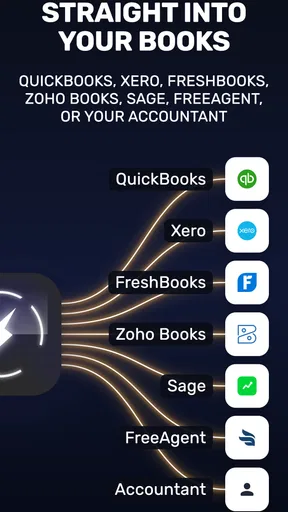
Yes, SparkReceipt offers integration with several popular financial apps and accounting software. This feature allows for seamless data transfer and synchronization, making it easier to manage your finances across different platforms. Check the app’s settings for a list of compatible software options.
What are the main limitations of SparkReceipt: Expense Scanner?
While SparkReceipt offers robust features, the free version has limitations, such as a cap on the number of receipts you can scan monthly. Additionally, some users may find the premium subscription cost prohibitive. The app's performance can also vary depending on the device's camera quality and processing power.


